A few weeks ago I decided to clean up a lot of my social media accounts and create new ones specifically for my blog. As an update on that, I’m enjoying all of my decisions so far! Separating my Instagram accounts was definitely a good decision (you can find my new account here!), and it’s opening up a lot of great opportunities for me as it continues to grow. Aside from Instagram, I also created a new Tumblr account specifically for my blog, something I’d never considered doing until I stumbled upon a few successful accounts made by other college bloggers. Tumblr isn’t exactly new territory for me, but I’d never used it with the intention of getting my own content shared; it was just a fun platform to find cool pictures on. Since then, I’ve been following tons of blogs and learning about how successful users are getting their content shared so well, and I wanted to share some tips for anyone interested in trying this platform out too!
Create A Unique Blog Design
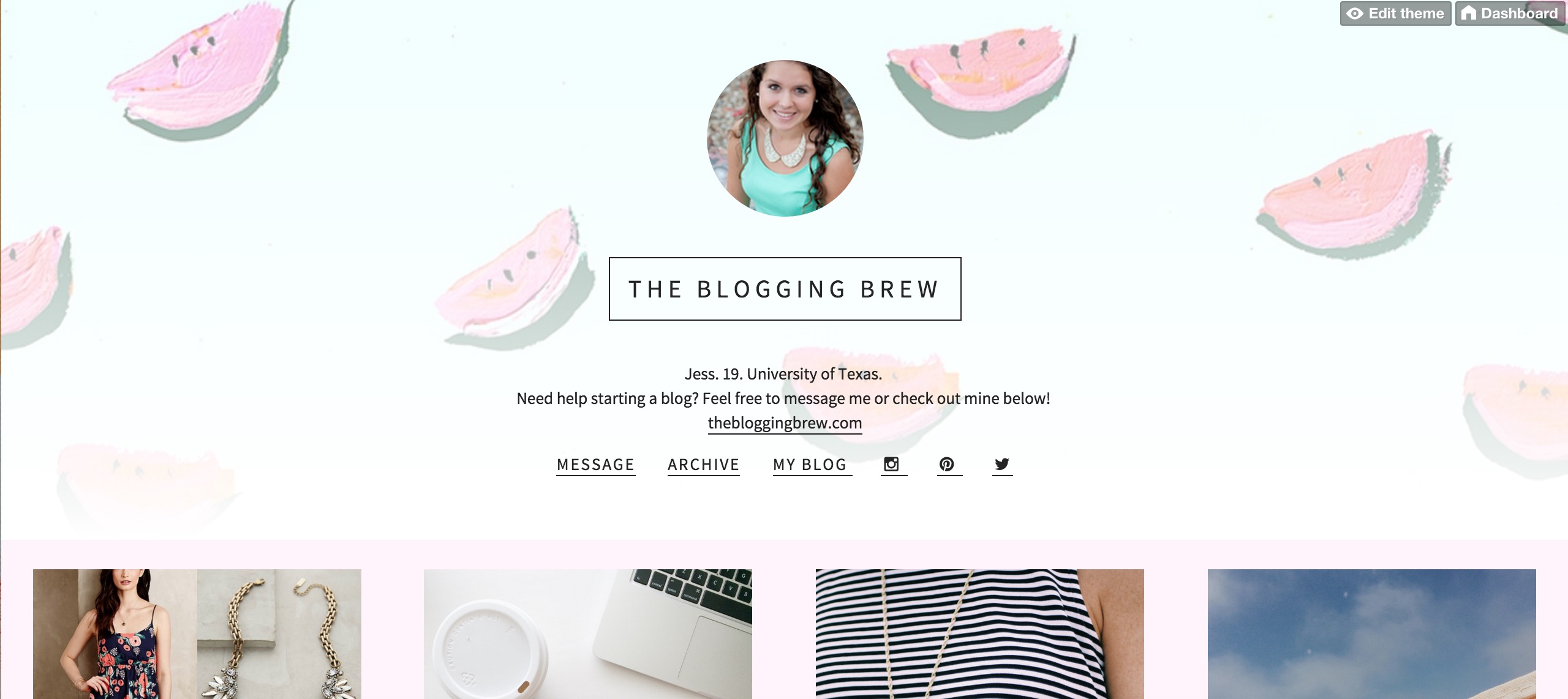
By default, every Tumblr user starts out with a basic blog layout with a single column of posts and a header. Standing out is always a good thing, so the first thing I did was find a new template and customize it to fit the tone of my blog. I love Olle Ota Themes, because their templates are very minimalistic and clean, but give a lot of options for customization! If you don’t have experience with Tumblr themes, they have a great tutorial for installing them too. Here’s how my design came out:
Make It Easy To Find Your Blog
Most themes give you the option to add links to your layout’s header, and this is where you can add a link to your main blog. I also mentioned my blog in my bio, so it’s easy to tell that my Tumblr is an extension of my main blog. This navigation area is also a great place to add your social media links; my theme made it super easy, and even has the icons for each platform ready to go!
Let Your Followers Contact You
Interacting with followers isn’t anything new, but it’s a little more complicated on Tumblr than other platforms. Make sure you have your messages set up so anyone can send an ask to you, including anonymous messengers! You might get some spam, but there are a lot of users out there that simply feel more comfortable asking a question without sharing their name.
Decide On A Tone For Your Blog
This is where having separate accounts for your personal life and your blog comes in handy. My personal blog has everything from funny pictures of kittens to beautiful landscape photography, meaning there is no consistency whatsoever. I’m a lot more restrictive on my blog’s account, and only reblog pictures if they’re of good quality, are 100% appropriate, and represent my blog’s values. I love bright colors, clothing, and traveling, so that’s about all you’ll find on my Tumblr!
Only Share Quality Photos, And Avoid Too Much Text
Tumblr is kind of like Pinterest in that your photo means everything. That doesn’t necessarily mean you need to put a ton of info in your image though, if any. Tumblr is a great place to use your raw pictures, without the text overlays and other promotional edits. Unfortunately, most of my blog graphics are exactly that, because they’re created with Pinterest in mind, so I try to get as much information as I can into one graphic. This pushed me to start taking more quality pictures throughout my day to use on Tumblr, and so far that plan is working out!
Bonus Tip: If you’re active on Instagram, connect your Tumblr account to it for easy sharing!
Look At What Other Users Are Asking
One of the most frustrating things about Tumblr is the long wait before users actually start asking you things. At 20 followers, I’m no where near that point, but I follow a lot of popular blogs and see what they’re being asked all the time. Occasionally, I’ll see someone ask a question that I’ve written a post about, and I’ll reblog the ask with a link to my post if it seems like they’d find it useful. This has also helped me find new blogs and gain more followers!
Talk To Other Users
Just posting on Tumblr isn’t enough to make yourself known. Talking to other users will really get your name out there, and potentially land you some new friendships! If you find a blog that you absolutely love, send them an ask and let them know. You’ll make their day just a little bit better, and maybe get a new follower too!
The Queue Is Your Best Friend
One of my favorite features of Tumblr? It has a queue built in, meaning no need for extra applications to schedule your posts! If I know I won’t have time to post for a few days, I run through my dashboard and queue up around 20 posts. Tumblr takes care of all the time intervals, and you can even choose how many posts you want to go out each day. That really helped me over the past two weeks when I didn’t have internet access!
Do you use Tumblr for your blog? Let me know your URL below, and what your experience has been with it!

I opened and closed Tumblr blogs for the last 4 years, because I loved to be there but I couldn’t find an actual purpose to my Tumblr. Last Spring I decided to join it again for sharing my stuff concerning a Tumblr book club called Tolkien Read-along. Once it finished it, I was struggling with my blog purpose again, so I decided to call it as my main blog and now we’ll see. I never thought to promote my posts on Tumblr! (You can find me at thegeekyburrow.tumblr.com btw)