• Blog
  • About
  • Categories
    • blogging
    • design
    • coding tutorials
    • making money
    • social media
  • Resources
    • Subscriber-Only Resource Library
    • How To Start A Blog
    • Blogging Tools
  • Best Of
  • Contact

The Blogging Brew

Blog Tips + Tutorials

How To Design An Effective Blog Footer

April 16, 2015 • coding, design • Comments

I wrote about six ways to dress up your sidebar a few months ago, and I received a lot of comments from bloggers who were either thinking about or in the process of redesigning their sidebars. It sounded like everyone was excited to tackle that project, and I loved hearing how inspired they were! So to continue on the blog inspiration trend, I want to talk about another neglected space of most blogs—the footer.
How To Design An Effective Blog Footer

Unlike the sidebar, the footer is hidden for most of the time a reader spends on your blog. The only way they’ll usually see it is if they’re curious about your blog and want to scroll through your home page, or if they decide to comment on a post they enjoy. It can seem redundant to spend time designing a part of your blog that doesn’t get nearly as many eyes as your content, but the eyes that do see it are most likely ones that are interested in your blog and want to learn more!

Similar to the sidebar, your footer takes up a good chunk of space on your blog, and has the ability to take up more than you might think. My footer is a little over 200 pixels in height, and I’ve seen even bigger ones! A lot of bloggers just put an attribution there, which is perfect if you’re looking for something simple and don’t want it to draw attention, but if you want to make your footer even more effective, there are tons of things you can add and style to your liking! Here are some examples:

  • Email subscription opt-in
  • Category buttons
  • A logo element
  • Your contact info
  • Social media icons
  • Navigation links
  • Instagram/Pinterest widget
  • Mini bio
  • Popular posts list

What’s best for my blog?

Depending on your blog’s content and your content marketing plan, some footer elements may benefit you more than others. For example, if you offer a mailing subscription for your readers, I would definitely recommend placing an opt-in in your footer! Likewise, if you create beautiful artwork, products, or anything visual and post about it on a social network, placing a widget for that social network in your footer would be beneficial. It’s all based on your needs! That said, try to avoid putting too much in your footer. It can easily take on a cluttered look, which isn’t what you want your readers to see after they’ve finished reading your amazing content!

Styling Your Footer

For simple styling, you can generally just edit the CSS of the “footer” tag. Here’s an example on one of my demo blogs:

footer {
     display: block;
     background-color: black;
     color: white;
     border-top: 3px solid #c4a0a4;
}

This is the effect that code would produce (the link color was set elsewhere in my stylesheet):

Footer Screen Shot

Footer Inspiration

I’m sort of a blog design enthusiast, so I love finding inspiration from other blogs and seeing what creative ideas are out there. If you’re planning on redesigning your footer, try searching around your favorite blogs and see what they included, or how they went about designing their footer to match their blog. I’m not saying you should steal their ideas, but looking around can really help when you’re stuck on what to do! Here are some of my favorite footer designs:
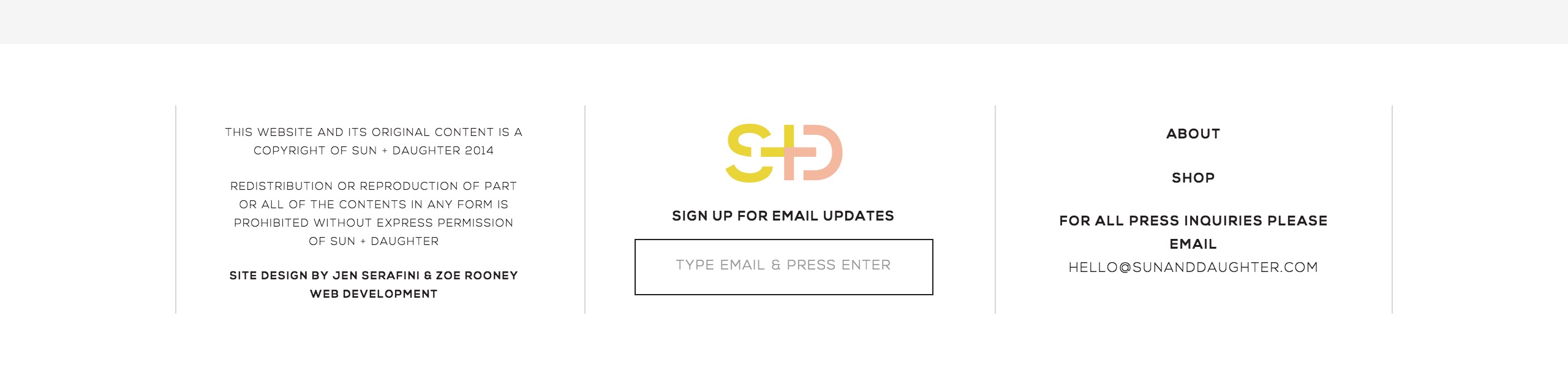
Sun And Daughter Footer

Source: Sun + Daughter

Love Grows Design Footer

Source: Love Grows Design
Meredith Noelle Footer

Source: Meredith Noelle

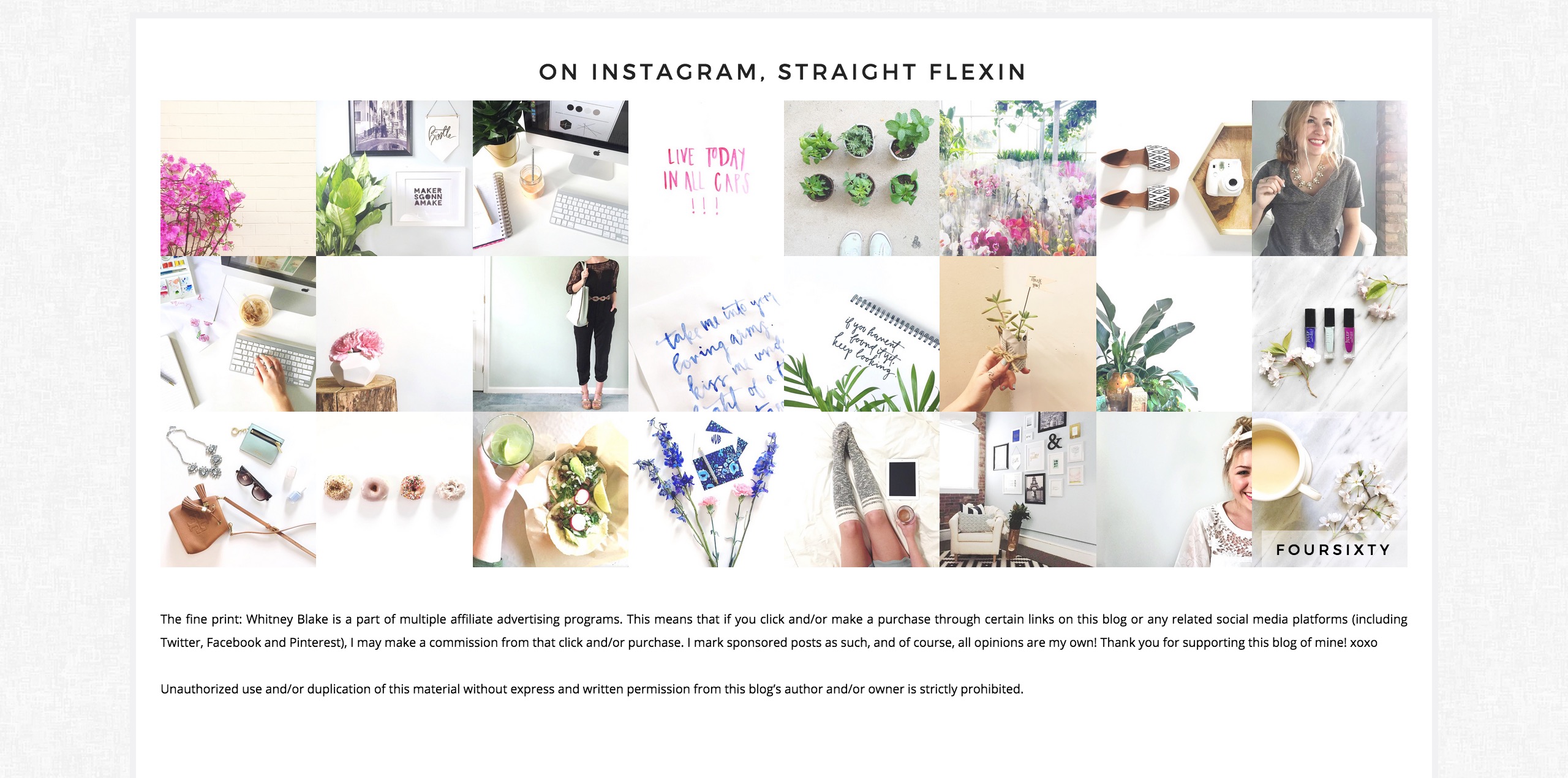
Whitney Blake Footer

Source: Whitney Blake

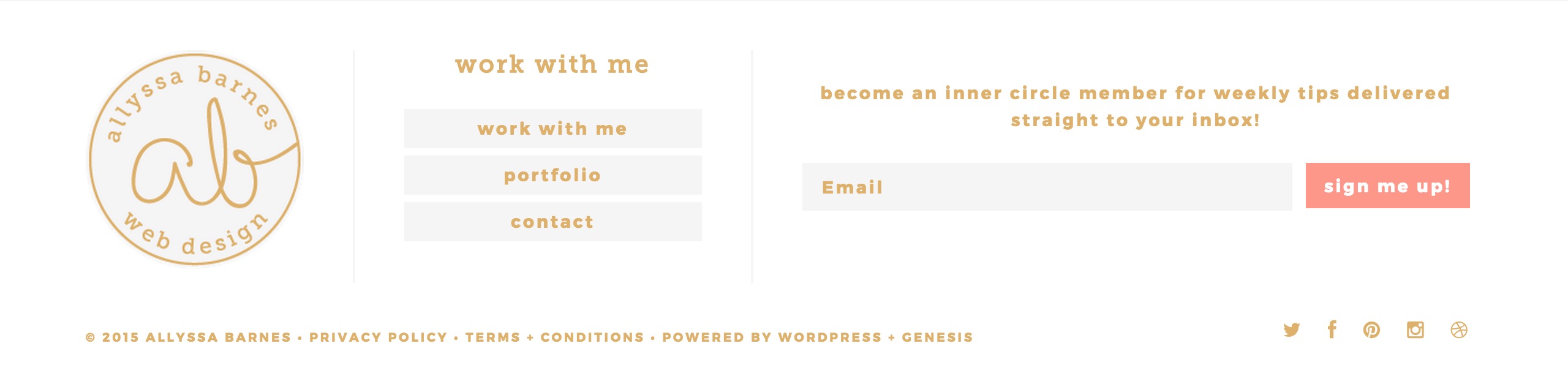
Allyssa Barnes Footer

Source: Allyssa Barnes

Are you considering giving your footer a makeover? What are some things you’d consider “must-haves” for a footer?

coding, design Leave A Comment

Beautiful Blog Designs No. 1

April 12, 2015 • design • Comments

Beautiful Blog Designs

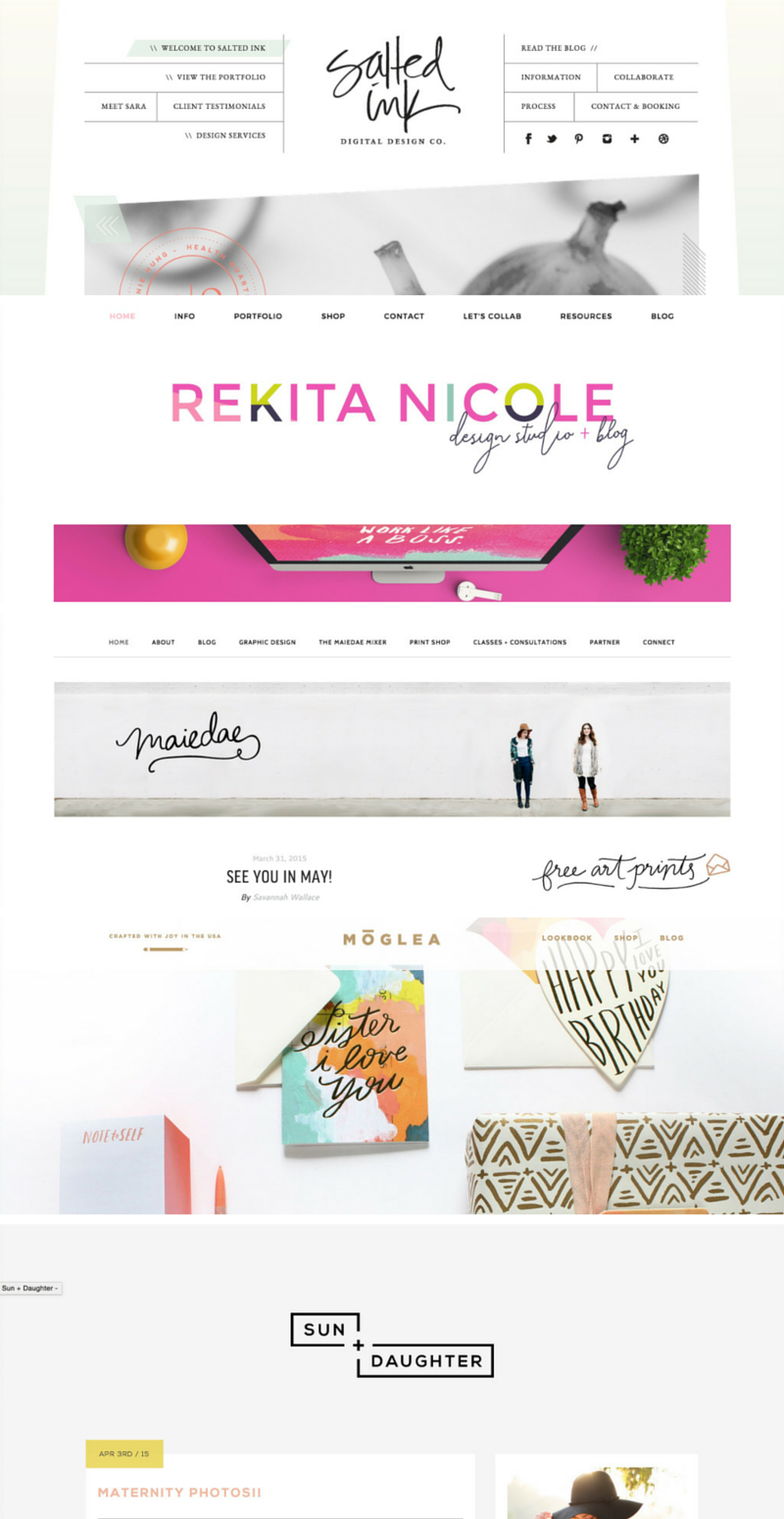
For those of you who don’t know, I’m kind of a blog design enthusiast. I love seeing how designers make such beautiful creations out of pixels, it’s like an art form in itself! I’ve been tapping into the design world recently with hopes of selling pre-made templates soon (eep!), and whenever I’m feeling uninspired, I start blog hopping in search of new ideas and beautiful blogs. I thought I’d share some of my recent favorites with y’all, because I have to imagine most bloggers out there love seeing great designs as much as I do! These are the blogs/shops from the graphic above:

Salted Ink

I love the relaxing vibe of this website. It has one of my favorite logo designs, and the same handwriting is used throughout the website’s graphics. The slanted look of the main content area is something I haven’t seen before, and it looks so great!

Rekita Nicole

The color palette on this website is just gorgeous! There’s enough white space that the colors aren’t too in-your-face, but it still gives off an energetic and fun vibe. And that logo is beautiful!

Maiedae

First of all, this is one of my favorite blog names. The letters just work so well together, and they form into a beautiful logo. The wide graphic below the navigation is another look I’m loving! If I had a blog partner, that would definitely be a must-have.

Moglea

Another interesting blog name! I love how the front page has almost no text—just images. It’s a great interactive look, and their beautiful products get all of the attention!

Sun And Daughter

This blog has such a simple design, but I can’t get over how much I love the color combo! The logo follows this simplistic theme, and of course, it’s also one of my favorites. I think I just love everything?

design Leave A Comment

How To Use The Genesis Framework To Your Advantage

March 24, 2015 • blogging, design, Genesis Framework • Comments

So you decided to take the leap and purchase the Genesis Framework. Every other blogger you know has been raving about it, meaning it has to be fantastic, right? You complete the download, install it onto your blog, and…now what?

If you’ve never designed a blog before, or are still dipping your toes into those waters, it can feel a bit overwhelming to make such a big purchase and not really know what to do with it. You might see other blogs claiming to be built off the Genesis Framework and think, how in the world did they go from this to that??? I felt the exact same way for a while, and thought I’d just wasted a huge chunk of money. Let me tell you. That was one of the best investments I’ve made in this blog to date.

Before I get into my tips for using the Genesis Framework, if you’re new to WordPress, I would suggest learning the terminology used throughout this platform. That was probably my biggest issue when I switched over, because every time I read a tutorial, I had to go searching for the definition of words like “child-theme”, “framework”, and “plugin”. Once you have all of that down, working your way around WordPress will be a breeze.

Now, I like to think of the Genesis Framework as my personal assistant. It organizes all of the complicated aspects of WordPress into a simple, easy to use format. Rather than having to learn about every single WordPress feature, I can focus on my job — creating content and designing my blog. Here are a few other ways to get the most out of the Genesis Framework!

Make use of the Genesis widgets

Included with your Genesis Framework purchase are a few widgets that you’ll find to be extremely useful. They’re fairly simple, but that’s what makes them so great. You can display featured posts/pages in your sidebar, provide a subscription sign-up, or even add an image slider! Because they’re from Genesis, they’ll integrate perfectly with your blog, and you don’t have to go searching for plugins to do the same job.

Choose the right child theme

To be honest, any of the child themes are great starting points. As long as you know how to code or have a designer to code a design for you, there’s a good chance you can transform a pre-made theme into exactly what you want. For example, my blog looks nothing like the original child theme I chose!

I suggest looking through each child theme to see what features it already has built in though, especially widget areas and page templates, because those can be hard to code yourself. I loved how my theme came with a home page with a ton of widget areas, so if I ever want to make a shop website, I can simply reuse that theme!

Get to know your CSS stylesheet

My absolute favorite part about the Genesis Framework is that child themes are the default. You automatically receive the Genesis Theme with your purchase, meaning you can start coding a design right away. Whether you choose to stick with that theme or purchase a different one, the first thing you should do is look through the CSS stylesheet (this should be the style.css file within your editor). This is the code that styles your blog, and affects everything from your post title font to the background color of your sidebar. If you know the basic layout of your CSS stylesheet, it’ll make designing your blog a quicker process, and you won’t end up rewriting code that’s already been made.

Make your posts SEO friendly

The Genesis Framework does wonders in the SEO world, and is designed to take advantage of meta tags and page structures. While just having the Genesis Framework installed on your blog can help boost your ratings, you still need to feed it great content and SEO friendly work! That means including keywords in your post titles, creating strong first sentences that give an idea of what your post is about, and writing keyword-rich, lengthy content.

Use the provided resources

With your Genesis purchase comes a fantastic resource – the Studiopress website. The support groups will be your life saver during the implementation and design process, trust me! Every time I ran into a problem, I just searched through that forum and almost every time someone had asked a similar question. If not, you can always make a new thread and wait for a response from some professional Genesis users! Be careful though, they seem to be very particular about how you make your questions, I guess to keep the forum clean and organized. After reading through a few threads, you’ll understand what I mean!

They also have an entire page of tutorials, which are perfect for when you’re first getting started and don’t want to skip a step in the installation process. There are even some more specific tutorials for design elements like sticky navigation bars and adding a Pinterest button! Seriously, you can do everything with Genesis.

Purchasing the Genesis Framework will cost you $59.95, but think of it this way. That’s a one time purchase, meaning you can use this framework on multiple blogs, as many times as you want. And that goes for the themes as well!

Have you purchased the Genesis Framework? What are your thoughts? If not, are you considering it?

blogging, design, Genesis Framework Leave A Comment

Newer Posts
Older Posts
The Blogging Brew Jessica Slaughter
Get To Know Me!

Hey y'all! I'm Jessica, a 19-year-old sophomore at the University of Texas majoring in Electrical Engineering. I'm passionate about technology, startups, and helping others lead more creative lives. Follow along for blogging tips and tutorials geared towards helping you start and maintain a successful blog!

Follow


Pin with me?

Before & After: A FiBefore & After: A FiDay Kornbluths careInteriors: Open marbI love the architectBlack Kitchens Are Nkitchenwood & black kitchenThe Best Side + Acce
TAP

On Instagram

 gotta guava  why is everything in Austin so photogenic?  Studying for my last test till finals!!! Also I forgot how good iced coffee is I'll take 5 more of these ☕️  I haven't opened my laptop in a week, so I guess that shows how great Colorado was! ❄️
TAP

THE ARCHIVES

Networks

Favorites

Investments Worth Making For Your Blog
How To Choose The Right Blogging Platform
Why I Love The Genesis Framework
How To Make Extra Money From Your Blog
Things To Consider Before Editing Your Blog Design

All Content © 2016 Jessica Slaughter · Designed By Me · Disclaimer