Living on a college budget means my access to software like Photoshop and Illustrator is limited to finding an open computer in the library, or getting someone to let me use the free trial on their computer (it was totally worth it). Paying full price for either is out of the question, and with no form of income yet, I don’t want to jump into a year-long contract at $20 a month. My solution? Well, there’s a free version of everything, right?
While searching for a free alternative, I had a few requirements in mind:
- Ability to use my own fonts
- Unlimited use (no limit to the amount of graphics I can make before being forced to upgrade)
- A snap-to-grid function
- A feature for adding shapes/lines/other graphics
- Easy to use, not glitchy
After reviewing several free programs, I ended up with two strong fits: PicMonkey and Canva.
PicMonkey
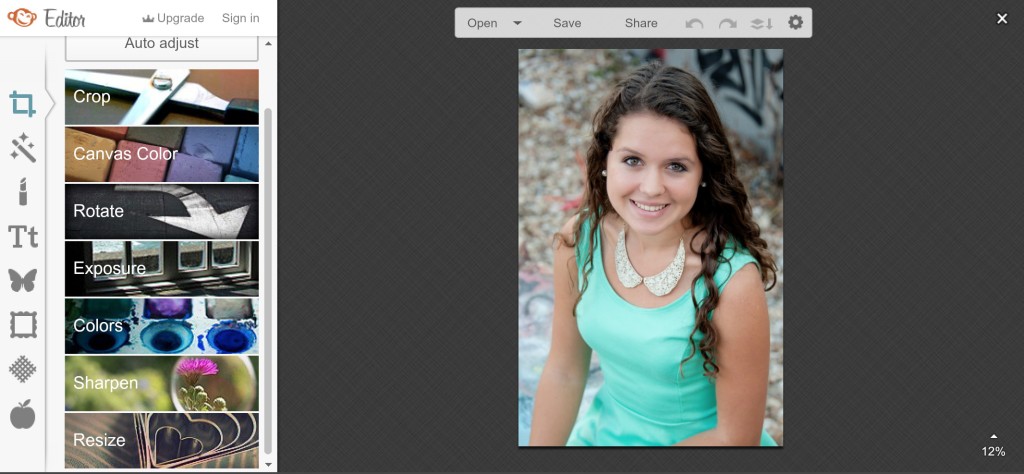
PicMonkey is my go-to website for photo-editing, designs with transparent backgrounds, and any quick edits I need to make. It’s extremely easy to use, and it comes with a lot of pre-made add-ons like filters, frames, and graphics. Here’s a basic summary of its features:
- A text feature that allows you to use your own fonts
- An “overlay” feature with tons of pre-made graphics, from trees and flowers to banners and flourishes
- The ability to use a transparent background, which isn’t available on a lot of free websites!
- Basic editing features like cropping, exposure, rotation, and resizing.
For my visual readers, this is what the format looks like:
There are extra features available to those who upgrade, but I’ve never found a need to make that jump. It’s only $4.99 though, so if you do find some features you want to unlock (like more filters and overlays), it’s not too much of an investment!
Canva
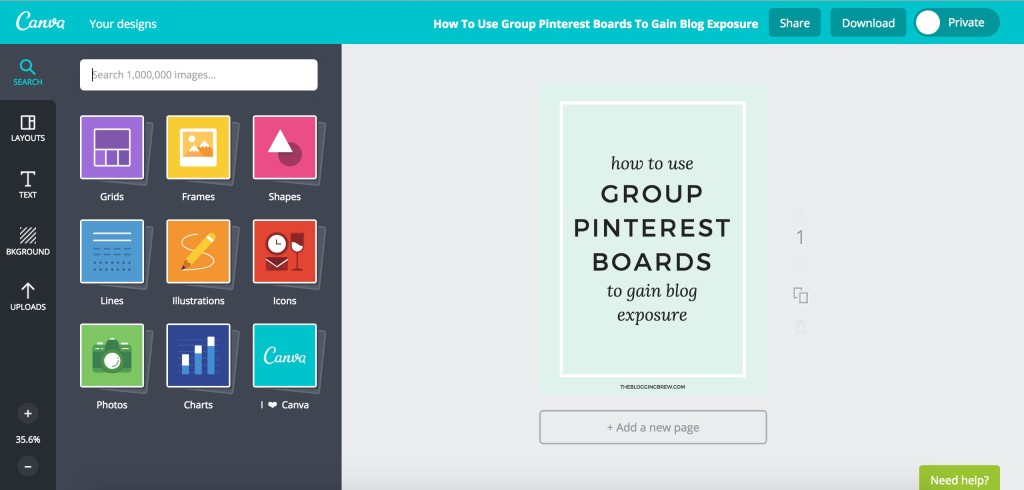
Canva is what I use to create most of my graphics, including the one I made for this post. This website is more suited for graphics that don’t involve photos, although it still has a few features for them! There are hundreds of pre-made graphics, to the point that it’s nearly impossible you won’t find the shape or line you’re looking for. Canva also saves all of your graphics into a simple feed, so you can always go back and edit one or copy it for use as a template. Here are some other useful features:
- A snap-to-grid feature, perfect for centering your work
- Pre-made graphs and charts for use in infographics
- A grids feature with tons of collage layouts
- Textured/patterned backgrounds, like the one in my graphic above
- Dimensions for different uses, like Facebook cover photos or Pinterest graphics
The layout is simple and ad-free, which is always great!
Canva also has a great blog, called Design School, where they provide tips for using their website and creating beautiful graphics. Definitely a bonus!
Why Do I Use Two Websites?
While Photoshop has just about every feature you could need built into one package, that’s not the case for most free websites. PicMonkey and Canva are both great websites, but neither of them do everything I need. Fortunately, when combined, they have most of the features I’m looking for, and switching between them isn’t a horrible inconvenience. For example, PicMonkey allows me to use my own fonts and transparent backgrounds, while Canva has a snap-to-grid feature and more pre-made graphics. “Two is better than one” just holds true for this scenario!
What graphics program do you primarily use for your blog? How is it working out for you?